Toast
Toasts are small, unobtrusive pop-up messages used in UI design to inform users about something that just happened (e.g., successful save, error message, etc.). They’re usually temporary and disappear after a few seconds.
⚠️ Important: You must wrap your app with
SmacOverlayProviderto useuseGlobalOverlay. More:Installation.
Usage
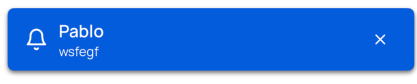
import { useGlobalOverlay } from "@smartacteam/react-native-ui";
import {
  Button,
  useGlobalOverlay
} from '@smartacteam/react-native-ui';

export default function BasicTabs() {
  const { showToast } = useGlobalOverlay();

  return (
    <>
        <Button
          variant="secondary"
          label="Show Dialog"
          onPress={() => {
            showToast({title:'Pablo', description:'wsfegf', variant:'primary', leftIcon: "bell"
            })
          }}
        />
    </>
  );
}
Toast Component
<Toast
  title="This is the primary toast!"
  description="This is a toast description"
  variant='primary'
  leftIcon="bell"
/>
Props
You can view ToastOptions on useGlobalOverlay page